Vector illustration by LoneWolf
Posted by
TONI
"Yunique_Solutions Inc, the developer of product_lifecycle_management solutions for the fashion industry, has added new image management capabilities to its flagship PLMOn solution. The tools include an advanced digital storyboard, image sharing, and Adobe integration, and are aimed at addressing the needs of fashion designers, merchandisers, and product developers. The image cataloging tools enable users to place materials, trims, sketches, technical drawings and pictures into a digital storyboard for use in line planning, line selection, and visual collaboration with suppliers and customers. Once design and merchandising concepts are added, the digital storyboard serves as a natural starting point for product developers to launch new raw materials and product/style development from this visual workspace.
The browser-based software is said to be fully compatible with both PC and Mac operating systems and allows users to work directly with popular design file formats, including industry-specific CAD systems.
Yunique has also developed Adobe Illustrator tool boxes that provide fashion-specific brushes, symbols and other design tools for PLMOn users. Product information can be shared and modified by in-house teams, across the supply chain or with customers."
Posted by
TONI
Skateboarding custom (vector) shapes for Photoshop by lukeroberts To download, click here. 
Posted by
TONI
 In February I posted a detailed scalable political vector map with most countries, well today I found another large vector flag collection for Adobe Illustrator. The pack contains 274 national flags, all vector, THANKS to raknoob. The archive file is a self extraction application (.exe file) download it from here. I'm not sure that you can run an exe file on a macintosh, so for all mac users I made a zip archive available for download here. Enjoy !
Posted by
TONI
This is a pattern tutorial for Adobe Illustrator I came across this morning, browsing computerarts.co.uk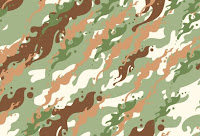 " Have you ever needed to create camouflage patterns in Illustrator, but not known the best way to go about it? Derek Lea demonstrates his own time-saving method" Full tutorial and files
Posted by
TONI
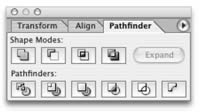 Pathfinders and shape modes in Adobe Illustrator are an important feature. If once you start to feel comfortable with them you’ll find them pretty handy for drawing all kinds of complex objects. Before you start drawing the shape of your object you should first analyze it. Look for geometric shapes within the object’s shape. Which shapes can be used to create your final object? Look for pkaces where you can use the ellipse or the rectangle tool. Most pathfinders delete objects, so have in mind to make additional duplicates. I found a great link ( click here) with video explanation of the different pathfinders.I'll post more stuff about pathfinders and shapes pretty soon.
Posted by
TONI
 24th March 24th March
The Inkscape community today is announcing the release of the newest version of its open source vector graphics editor. Inkscape 0.46 is a major update that introduces native PDF support. The implementation of PDF support in Inkscape provides an easy, open source solution to editing PDF documents. Tons of new features and performance improvements are included in this release. Dialogs now have the ability to be docked to the editing window. Gradients can be edited completely on-canvas. The new Paint Bucket Tool fills bounded areas with color. A new 3D Box tool helps create perspective-correct drawings. A new Tweak tool provides an intuitive method for editing paths and painting objects. The new Live Path Effects feature can create "brushes" and various organic effects on paths. Improvements to color management include support for color spaces other than sRGB. Most SVG filters are now implemented, and a new powerful UI is provided for editing filter stacks. Check it out www.inkscape.org
Posted by
TONI
I decided to post a brief keyboard shortcut list for Adobe Illustrator for more efficient work with the pen tool. MAC OS / Windows
Command / Ctrl = will temporary allow you to access the last selection tool you've used
Command+Space / Ctrl+Space = again a temporary access to the zoom in tool.
Option+Command+Space / Alt+Ctrl+Space = zoom out tool.
Shift / Shift = A really helpful shortcut - constrains proportions, angles, movement. It works for almost all actions in Illustrator
Spacebar = Gives you temporary access to the hand tool.
Note: The benefit of using these keyboard shortcuts is that you don't need to always activate and deactivate your line (path) for similar manipulations.
Posted by
TONI
Here is an usable free shape true type face by protofonts. If you use this typeface in Illustrator and outline the characters, you may come across many interesting symbols. Download
Posted by
TONI
This set contains 25 different blood cell shapes by ardcor. As you can see in the preview below, the quality of the brushes is high and you can get a pretty realistic effect without a lot of effort. Download
Posted by
TONI
Events need branding as much as anything else. Derek Lea reveals the creative process and technical considerations involved in designing an appropriate and versatile event logo. Effective logo design requires careful consideration of a variety of things. The creative process must include considered technical execution, as well as focus on creating a stunning, effective, and simple visual metaphor. Generally, the process begins with a brief from your client. Even the most basic brief must communicate the core, intrinsic values of the brand. It is with these values in mind that you can begin the process of designing an appropriate visual metaphor. Read full tutorial and download files. computerarts.co.uk
Posted by
TONI
A free pack of 28 vector pattern swatches for Adobe Illustrator Nagash.
• Stripes in 7 different sizes, rotated left and right
• Straight line and faux-pixelated line
• Black-transparent, and black-red variations
Illustrator comes with both vertical and horizontal line patterns, but not diagonal lines. it's hard to get them correctly tiled, but I got it tight - when you resize it, sometimes you get messy corners, but there's nothing one can do about it...

Use the black-transparent versions to get a single color stripe, and the black-red if you need two colors. To change the stripe color, simply drag the pattern to your canvas, paint it, and then drag to the swatches pallete again.
To use, load the PDF file in Adobe Illustrator and open the swatches palette (Window>Swatches). Download
Posted by
TONI
A collection of 25 grunge swatches for Adobe Illustrator from createsk8.com. They are all in different colors, you could use them as textures or for designing a grungy background element...
To use the resource first, you need to expand the .zip file, load the AI file with Adobe Illustrator, open the swatches pane (Window>Swatches) and apply them to your fill color. Download

Posted by
TONI
Another vector style proposal for you desktop from sourcake. Click on image for full size preview. 
Posted by
TONI
This vector pack could probably be in use for those who are working on a night club or some kind of a music event flyer or poster. The file is compatable with Adobe Illustrator CS3 Download Author's profile
Posted by
TONI
Amazingly cool concept by dfever (made in fireworks pro)that I just saw in deviantart. Balanced copmostition, great use of type and lines as a design elements on a 45 degrees scale. 
Posted by
TONI
Here is a short list of tips for drawing smooth and controlled lines with the pen tool in Adobe Illustrator.
- Drag your handles around one third of the length of the curved line.
- Drag handles while you're creating the first anchor point for a curved line. Drag away from from the previous line and towards the direction you want to the cirve to be directed.
- Use as few anchor points as possible.
- Position anchor points where lines change their direction.
Posted by
TONI
Here is another great wallpaper based on Jason Brooks Hed Kandi style of illustration done in Adobe Illustrator by Ianwoollam Click on image for full size (1920×1200 pixels)
Posted by
TONI
Free vector shapes for Adobe Photoshop from d2m. Ideal for logo design.To use them, load the csh file in Photoshop, you'll find the different variations of the shape under custom shapes. Download
Posted by
TONI
 ICON5 will be held in New York City at the historic Roosevelt Hotel in midtown Manhattan. This year's theme, The Big Picture, is more than a slogan, it is the perspective through which we see our future – a future of limitless possibilities for illustrators as thinkers, story tellers and providers of creative content. The conference promises to examine and discuss the current creative and economic forces that our industry faces today. The conference will be held July 2-5, 2008 in New York City at the Roosevelt Hotel. Conference registration can be done online, by fax, or via mail. Special pricing shown below is for online registration only. More
Posted by
TONI
This updated plug-in creates layers in Illustrator CS3 that correspond to the layers in the DFX or DWG file and imports the objects in the corresponding layer. However, because of differences in the way layers are treated in Illustrator and AutoCAD, object stacking order may change after importing a DFX or DWG file with this plug-in. More
Posted by
TONI
A vector floral butterfly brush set for Adobe Illustrator from coolwing. Download from here. Note: For mac / apple users you need to have StuffIt or other compression software to open the rar archive. You can download stuffit from www.stuffit.com
Posted by
TONI
Below you can see the final concept for a typographic word illustration assignment from school...
Typeface: Times New Roman;
Tools: Pen, Paper, Adobe Illustrator;

Posted by
TONI
 Zevriz Zevriz has updated InPreflight, a quality control solution for Adobe InDesign that lets users locate potential problems and produce error-free documents, to version 2.2.5. The software now correctly reports the color mode of Illustrator CS3 EPS files saved with the “Include Thumbnail” option. Full article
Posted by
TONI
Harper Arrington Publishing LLC(www.DigitalFashionPro.com) today announced the release of The Creative Pack 1 upgrade for Digital Fashion Pro - Fashion Design System. The DigitalFashion Pro System is an innovative solution that gives fashion designers, students, and even ordinary people the tools they need to design their own cutting edge fashion collection using digital fabrics and garment templates...
Harper Arrington"The Creative Pack 1 upgrade was invented to give clothing and shoe designers a host of new resources to develop their designs with," said Michael Harper, co-developer of Digital Fashion Pro and The Creative Pack 1, and co-founder of Harper-Arrington Publishing LLC. "The Creative Pack 1 features The Shoe Factory, Designer Series Templates Trend 1 Library, Digital Fabric Pack 2 and The Vector Art Gallery. We are really proud of this new product. We set out to make Digital Fashion Pro the best fashion design system in the world, and we strongly believe the Creative Pack 1 has brought us closer to that goal." Full article
DETROIT, Mich., March 3 (SEND2PRESS NEWSWIRE)
Posted by
TONI
EskoArtwork will showcase its leading, innovative software for the entire packaging supply chain at Packtech UK. The show is to be held at the NEC in Birmingham on 12 and 13 March. On its stands, EskoArtwork will demonstrate how it can turn the entire packaging supply chain - from brand owner to retailer - into a straightforward collaborative process, delivering consistent quality and importantly reducing production costs and time to market. EskoArtwork has a long and successful track record of developing innovative packaging solutions for brand owners and designers. The company's latest innovative software solutions offer integrated design tools that support the creative process and streamline the handoff to production. Based on Adobe PDF and compatible with Adobe Creative Suite 3 the solutions include a full range of powerful tools for structural design, graphic design, project management and collaboration, colour management and prepress production for packaging as well as the Enfocus suite of PDF tools Neo, PitStop Professional and PitStop Server. FULL STORY
Posted by
TONI
|


